Seven Things

Well, it had to happen sometime. Eli White (@EliW) was kind enough [aka: I’ll get ya back! ;)] to tag me in his own version of the Seven Things meme going ’round these days.

Meh, why not? So, I now have to detail seven things about me – some random, some weird – then find seven soul to harass with my new found mischievous streak.

Here we go:

  1. First thing first, I’m the proud dad of three beautiful boys between the ages of almost-3 to 9-and-a-half.
  2. I didn’t actually write my first PHP app. I wrote a script to convert it from Perl to PHP for me, around 1998-99.
  3. My favourite place to be is on a half pipe, with my son(s) and bmx/skateboard/snowboard, no matter the location.
  4. Although I live in Montreal, Canada, I’ll never EVER get used to its weather, yet still like it here.
  5. I dug part of our previously 4-feet-high clay basement by hand so I could have a wood workshop in our downtown duplex.
  6. I spent my childhood in France (0-12), teenage in Martinique (12-17) and adulthood in Canada (17-…).
  7. And finally, I hate how English spellcheckers highlight properly spelled words, such as favour, colour, and behaviour. :p

Now, for my preys, aiming for fresh ones:

  1. Pierre-Hugues Pellerin (@pierhugues), who will probably mention Ruby, despite his initials.
  2. François Lafortune (@quickredfox), who could write and illustrate a comic book published only in pure Javascript.
  3. Xopher Murtagh, who can play the trombone and probably find a way to get GNU/Linux running on it, somehow.
  4. Janina Szkut (@nanananini), who could probably mention something about knitting and PAX in the same sentence.
  5. Konstantin Ryabitsev (@mricon), who is probably already teaching four or five languages to his newborn son, who’ll probably read them fluently by age three.
  6. Sylvain Carle (@afrognthevalley), Praized Media‘s CTO extraordinaire.
  7. Evan Prodromou (@evan), who will (and should!) probably mention Laconica.

And to conclude, the complete rules:

  • Link your original tagger(s), and list these rules on your blog.
  • Share seven facts about yourself in the post – some random, some weird.
  • Tag seven people at the end of your post by leaving their names and the links to their blogs.
  • Let them know they’ve been tagged by leaving a comment on their blogs and/or Twitter.

Making Ubuntu Server Work in Sun's VirtualBox

Here’s a quick fix if you’re interested in installing a VM running Ubuntu Server in Sun‘s OSS virtualization tool, VirtualBox.

After installing the 32bit version of Ubuntu Server 8.10 in VirtualBox 2.0.4 on my MacBook Pro (OSX), I was faced with the following error message when starting the VM, which I found also happens on other platforms:

This kernel requires the following features not present on the CPU: pae

From Wikipedia:

Physical Address Extension (PAE) refers to a feature of x86 and x86-64 processors that allows more than 4 gigabytes (GB) of physical memory to be used in 32-bit systems, given appropriate operating system support.

Fortunately, the fix was as easy as pie:

  • Once VirtualBox is up and running, select your Ubuntu Server VM.
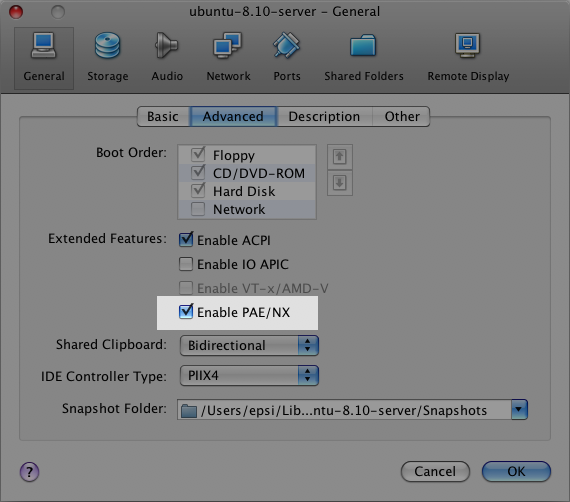
  • Go to the “General” configuration screen and select the “Advanced” tab.
  • Check the “Enable PAE/NX” option.

Here’s a screenshot:

Ubuntu Server in VirtualBox: PAE/NX option selection

Try starting your VM again, and all should go as planned. It did for me.

Praized is Now Live!

Yes! Praized Media, our Hub, Facebook application and other current integration options (API, plugins, etc) are now all live to the public and in full production gears. :)

Now Web publishers can easily write about local places while growing traffic and ad revenue. Praized is the first free local search platform designed specifically for social media sites like blogs, social networks and other online communities.

I said, back in January, how happy I was about joining the Praized team, and how much potential I was seeing in the company. Suffice to say, I’m just as ecstatic as I was back then, kicked up a notch or two.

Hey, maybe now I can reach inbox zero and start blogging again. ;-)

Edit: we’re getting some pretty good reviews so far. Crossing our fingers. Still work to do.

SSH Setup for EC2 UI on Mac OS X

If you are using Amazon’s EC2 as a cloud hosting solution, you owe it to yourself to install the most excellent EC2 UI Firefox extension (source) to manage your server instances (note: not yet compatible with Firefox 3).

Now, if you also happen to be on Mac OS X, one annoying thing is that EC2 UI is configured by default to be used on Linux (and GNOME). Looking online, all I could find were questions on how to set EC2 UI on OS X to use the proper terminal and ssh, but no answer.

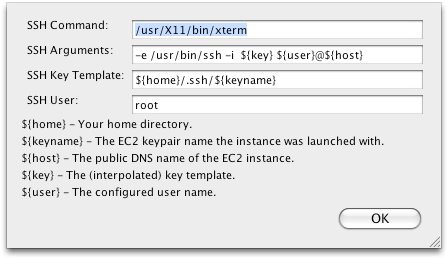
Fear not! Yours truly spent a few minutes on the case, and ended up finding a solution that is at least viable for myself, and will hopefully be for you as well. The trick is that I have X11 installed on my OS X box anyway, so I just use the binaries intended for this package.

EC2 UI setup for OSX

There you have it. Now, I can right click on any instance listed in EC2 UI and select “SSH to Public DNS Name”. X11 and xterm are both seamlessly launched and proceed to log me into the desired instance.