If an Apple designer pitched this craplution to Steve Jobs, he’d rip their still-beating heart clear out of their chest.
via HP Slate has a bad solution to “too many stickers” syndrome.
If an Apple designer pitched this craplution to Steve Jobs, he’d rip their still-beating heart clear out of their chest.
via HP Slate has a bad solution to “too many stickers” syndrome.
It’s details like the following that sometimes make me stop and realize how fined tuned a software Mac OS X really is.
Tonight, I did the following, sequentially:
Where things get interesting is that the process which was writing to the said file never crashed or in any way gave an error. It happily followed the files as they moved around, keeping on keepin’ on. Everything was handled cleanly by the Finder and abstracted from the process. Classy.
It’s also worth noting that the said process was not an Apple app, so no unfair advantages.
I was wondering why my home connection seemed to be crawling since yesterday. I didn’t worry too much at first, thinking that with my wife working from home yesterday as well, we were just downloading a lot of stuff between the both of us.
But the slowness persisted this morning. I took a peek at our bandwidth consumption and something became immediately obvious: there was something wrong on the upload end of things. We had somehow uploaded 2GB+ in one day, which is rather peculiar for us.
Turned out the issue at hand was an arcane bug involving Apple’s Mail.app “self-recovery”, MobileMe, Gmail, an oversized message and some kind of infinite loop.
I ended up solving the issue by simply trashing my entire ~/Library/Mail folder on my iMac, replacing it with a quasi-identical copy from my MacBook Pro and resyncing my mail accounts.
Problem now seems to be gone. Won’t get bitten by this one again…
I’ll admit to have been jealous of my good friend Xopher‘s Nexus One phone and its nifty Android-based, augmented reality Google Sky Map. But I knew I’d find a similar one for the iPhone.
Lo and behold, while in Seaside, a friend showed me Star Walk running on his iPad.
One thing the video doesn’t showcase is that the application makes use of the built-in compass, GPS and gyroscope. This lets you simply point your device anywhere and get a picture-perfect representation of what astronomical objects are in your field of vision as well as get all the details you could want about them.
At $2.99 for such a complete app, I think it’s a very good deal and entirely worth the expense.
Copernicus would be stoked. :)
If you are using Amazon’s EC2 as a cloud hosting solution, you owe it to yourself to install the most excellent EC2 UI Firefox extension (source) to manage your server instances (note: not yet compatible with Firefox 3).
Now, if you also happen to be on Mac OS X, one annoying thing is that EC2 UI is configured by default to be used on Linux (and GNOME). Looking online, all I could find were questions on how to set EC2 UI on OS X to use the proper terminal and ssh, but no answer.
Fear not! Yours truly spent a few minutes on the case, and ended up finding a solution that is at least viable for myself, and will hopefully be for you as well. The trick is that I have X11 installed on my OS X box anyway, so I just use the binaries intended for this package.
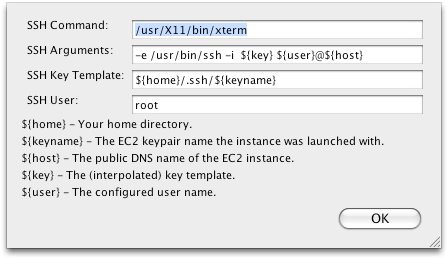
There you have it. Now, I can right click on any instance listed in EC2 UI and select “SSH to Public DNS Name”. X11 and xterm are both seamlessly launched and proceed to log me into the desired instance.
 tekArtist