Unknown's avatar

About Stephane Daury

Enjoyer of life; software developer. See https://stephdau.me and https://tekartist.org

Sony Barking Up the Right Tree for their PS3 Linux

Yellow Dog Linux for Playstation 3, featuring E17

Linux on the Playstation 3 (PS3) has been covered before, but the inside story is that Sony Computer Entertainment Inc. (SCEI) has entered in an agreement with Terra Soft Solutions (TSS) to bring Yellow Dog Linux 5 (YDL) to their next generation console, which was actually released today in Japan.

Under basic agreement with SCEI, Terra Soft was granted a unique opportunity to develop and bring to market a complete Linux OS for PLAYSTATION 3. In the development of Yellow Dog Linux v5.0, Terra Soft integrated and enhanced code from Barcelona Supercomputing Center, SCEI , and Fedora in order to offer the following: kernel 2.6.16, gcc 4.1.1 and glibc 2.4, Cell SDK 1.1, OpenOffice.org 2.0.2, FireFox 1.5.0 and Thunderbird 1.5.0, Nautilus 2.14 … and a suite of Personal Accessories, Development Tools; Sound & Video, Internet, and Networking applications.

This is indeed a fantastic opportunity for the dynamic team behind YDL, especially now that Apple has completed its transition to the Intel platform, leaving behind the Power architecture. But what could have spelled the company’s dismay is now instead referred to by Kai Staats, CEO of Terra Soft, as a potential blessing in disguise, thanks to the exciting Cell architecture.

In fact, YDL 5 will initially be released for the PS3 on its North American launch date of November 17th, with Apple and other PowerPC based systems supported later in the year. The product will be available to the YDL.net Enhanced members first (Nov.27), later on DVD (Dec. 11), and for download as a holiday treat (Dec. 25).

As a long time YDL user both at work and at home, I am ecstatic to know that TSS has found an exciting new revenue model for their solid offering, with a potentially quite large user base if the PS3 proves to be a success, despite heavy competition from the Wii and Xbox.

PS3/YDL/E17

Another big winner in this deal is the Enlightenment Project, since their E17 (DR17) desktop manager has been chosen to bring what promises to be a beautiful GUI to the YDL/PS3 combination.

When it came out in 1997, Enlightenment blew a strong blow to many other desktop environments, UNIX based and beyond, effectively delivering features such as window transparency to even modest hardware.

Having unfortunately suffered from project management issues in the past, Enlightenment lost tremendous ground to GNOME and KDE over the years, and I am glad to see the new development team benefiting from this project.

From game console to supercomputer

Provided the Power architecture’s performance in number crunching intensive applications such as modeling and rendering, Terra Soft is also a very strong contender in the scientific and supercomputing markets, thanks to their Y-Bio and Y-HPC products.

Y-Bio is Terra Soft’s solution for the growing life sciences market. Built upon the RPM Linux standard for package management, Y-Bio offers gene sequence analysis applications –tools which help bioinformatics researchers conduct their work with greater efficiency.

Y-HPC is Terra Soft’s cluster construction-management suite for Apple G5 (IBM 970) Xserves. Built upon 64-bit Yellow Dog Linux, Y-HPC offers 64-bit enhancements for code development. In use by the Department of Energy, Department of Defense, and University labs nation-wide, Yellow Dog Linux and Y-HPC are a preferred Linux platform for the Power architecture.

TSS is currently contracted by Sony to build of the world’s first Cell-based supercomputing cluster in their Loveland, Colorado headquarters.

So, thanks for complicating my life…

Okay, now that I had narrowed my choices down to either a Mac Mini or Apple’s upcoming iTV for our family room, you’re telling me I have to start over again?

Between the games, the Blu-ray/DVD/CD, flash memory and hard drive, the USB2 ports and now a powerful desktop OS making it a full fledged workstation, I might actually get a PS3 for my home office.

Sorry kids, that’s daddy’s toy! ;)
Warhol's "You Are the One" to Premiere at the Detroit MoNA

If you are in or near Detroit on November 12th 2006, you will have the chance to a attend what might be the only screening of a long lost Andy Warhol short digital film, created in the mid-80’s using Amiga computers, at the Museum of New Art.

Until its 2001 discovery, what had only been hinted at and rumored is that Warhol had actually created a short digital film on one such computer, probably the first such digital creation by any important artist. Titled YOU ARE THE ONE, the digital stills were discovered on a floppy diskz among thousands in Warhol’s estate. […] However, due to threatened legal action tied to estate disputes and to its pending seizure, the museum will only be allowed a one day screening of the film.

Passive House Platform

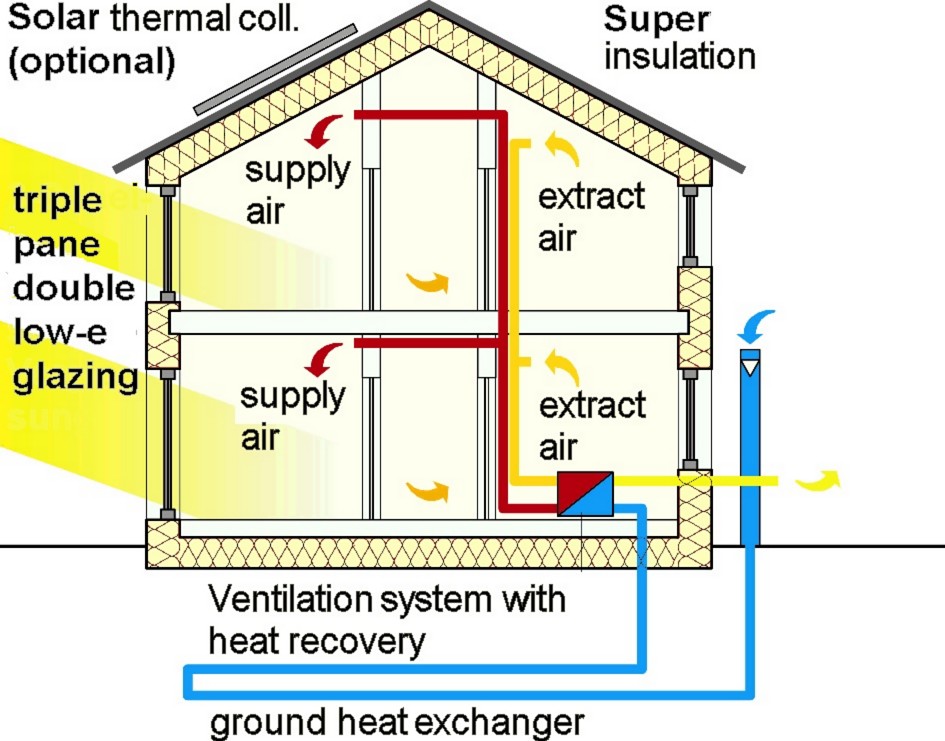
Browsing through Leonardo Energy, I found a post pointing to a very interesting webcast on a European standard geared toward ultra-low energy building, referred to as passive houses.

The term passive house refers to a specific construction standard for residential buildings with good comfort conditions during winter and summer, without traditional heating systems and without active cooling. Typically this includes very good insulation levels, very good airtightness of the building, whilst a good indoor air quality is guaranteed by a mechanical ventilation system with highly efficient heat recovery.

Related links:

Googly Googly Goo

If I was Glen Quagmire, the title of this post is probably what I’d be saying right now. See, we just received a new toy at work today! Namely, a Google Search Appliance (GB-1001).

Google Search Appliance

I’ll of course try to post my impressions shortly, but here is some reading material I combed through recently:

Now, to not let it shoot down my productivity on the other stuff I need to get done…

Fedora Core 6 VM Image for VMWare

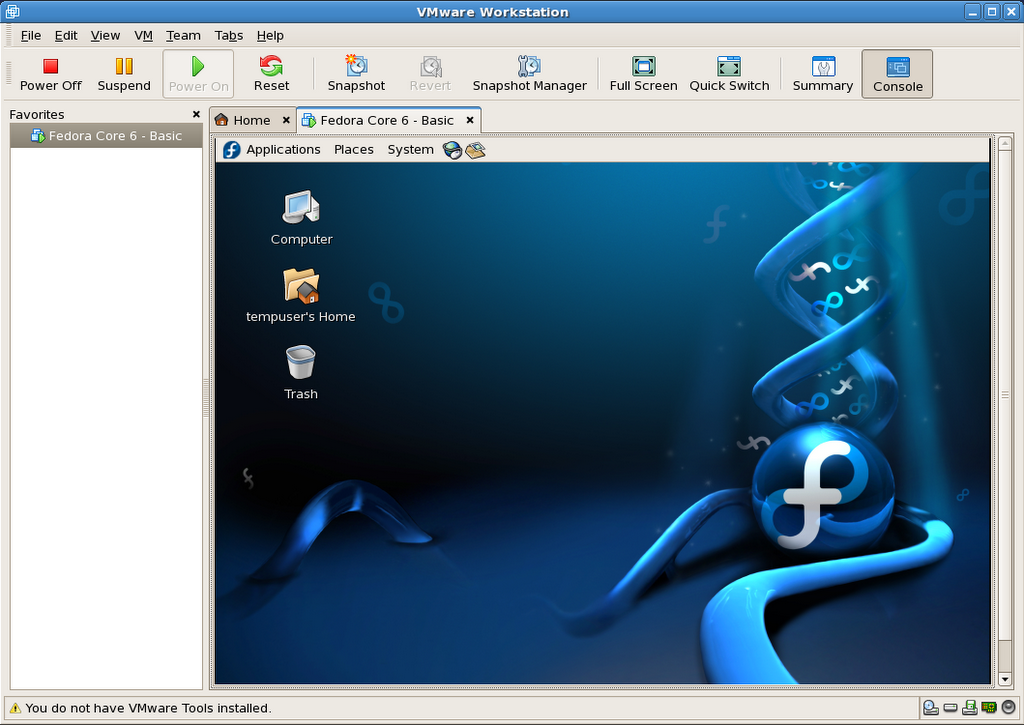
As previously mentioned, I have prepared a VMWare equivalent to the Fedora Core 6 image I am distributing for Parallels Desktop.

You can find the details below:

FC6_Basic_For_VMWare_5.5.x-Install_Screenshots.tar.gz:
http download (12.1MB)
This package contains 76 PNG screenshots of the installation procedure. They show the complete process, from setting up the VMWare image to shutting down a freshly installed and updated copy of Fedora Core 6. Please feel free to produce and distribute a screencast using these very images, if so inclined, as I do not have the time to do so myself right now. (update: I did after all).

FC6_Basic_For_VMWare_5.5.x-20061105.tar.gz:
http download (733.4MB)
This is outcome of the install process shown in the above screenshots. It is fully ready to go, as long as you already have VMWare installed (free player or other).

Here is a SHA1SUM of the above files.

Current hosting is generously provided by the McGill Linux Users Group, so please feel free to mirror, or create a torrent, and redistribute all of the present files. Until we have a new site for the McLUG, you can post your mirror addresses and/or torrent file download info right here, as comments. I will compile a list and add it to this file as (and if) they become available.

The VM package includes:

  • Fedora Core 6 – Basic: VMWare virtual machine folder
  • README.txt: helpful info, support terms (ie: zero, nada, ziltch :)
  • Fedora Core 6 – Basic – Install Screenshots: originally installed on an P4 1.65GHz
  • Fedora Mirrors.html: copy of the official Fedora mirror list
  • boot.iso: fedora boot disk used in original http install process

The install was completed on a Pentium 4 tower (1.65GHz, 1.5GB RAM) running VMWare Workstation 5.5.2 in Fedora core 6, and was also tested on a custom P4 3GHz system running Windows XP SP2 (player), as well as another P4 1.65GHz, but running Fedora Core 5 (workstation).

Once you have VMWare installed, simply double-click or open “Fedora Core 6 – Basic/Fedora Core 6 – Basic.vmx” to get going.

VMWare will most likely prompt you for a few things to adapt the image to your environment:

  • Prompts to create a VM unique identifier: choose yes
  • Prompts to map the virtual floppy drive to match yours: choose yes
  • Warns that the VMWare Tools are not installed: I did not bundle them as I’m unsure if VMWare would let me distribute the image freely once installed in the VM.

Important: The root password is changeme, and the default user is setup as tempuser, with a password of changeme also.

This virtual machine is currently configured to use 512MB RAM. The VM’s default screen resolution is set to 800×600. You can change any and all of its settings to your heart’s contempt.

Please note that this work is provided without support, and on a “works-for-me” basis only at this time.

So there you have it. Enjoy!

Update 1: Here is another source of ready-built VMWare images.

Update 2: 2006-11-29: Related post: Screencast: Fedora Core 6 Install in VMWare Workstation

Update 3: 2006-12-22: This VM will also run as is in the new VMWare Fusion Beta for Mac.